B-Mobile Launches 'Multi-SIM' Service
It has finally happened, we have a Multi-SIM service here in Brunei thanks to B-Mobile (Read the Borneo Bulletin article at Brudirect). Multi-SIM basically allows you to clone your SIM card to put in another device. This is great for people with 3G enabled devices: e.g. iPad 3G, Galaxy Tab, etc and want to be able to make calls / use data on those devices without having to sign up for another phone number or resorting to the tedious task of switching SIM cards.
There is a monthly subscription fee of $8 per SIM card and there are 3 configurations of the service:
- Multi IMSI i.e. primary SIM rings only;
- Simultaneously i.e. both primary and secondary SIMS ring at the same time; and,
- Orderly i.e. primary rings first. If rejected, busy, switched off or not answered, then the secondary will ring.
Multi-SIM is applicable for the following plans:
- Post-paid ZOOM $30 (with 2GB free data)
- Post-paid Smart Plan $35/$45/$55 (with 1.5/3/10GB free data respectively)
Sadly multi-SIM is not applicable for plans with unlimited data (e.g. Postpaid ZOOM $60 Unlimited & Post-paid Smart plan $65). There is no mention of OMNI users but since it’s an unlimited plan, I presume that it will not be supported either. I guess B-Mobile is worried that people will subscribe to the multi-SIM service and use the SIMs in an unlimited data fashion and thus would congest the network.
As an a subscriber to OMNI, I hope B-Mobile could consider another plan for users with unlimited data plans: single SIM get you unlimited data, multi-SIM gets a cap (of perhaps 200GB free beyond which they will pay per amount used as the non-unlimited data plans pay). This would at least give users with unlimited data plans an option to subscribe to this multi-SIM service and not be left out with the convenience that it brings.
So now with B-Mobile supporting this, I wonder if DST will follow
Gagalcast 1: Pilot Episode

Sadly there is no episode of Corner Geeks this week so we present Gagalcast: because we all fail now or then. Basically Gagalcast is random discussions before or after Corner Geeks recordings or just random discussion. This episode was recording after Corner Geeks 7: The Brunei Apple App Store at Patisserie in Gadong.
There are several videos to be released so stayed tuned and we should be back next week!
Corner Geeks 8: The Brunei Apple App Store
A ’live’ / non-Skype Corner Geeks recording this week as I sat down with @mfirdaus as we discussed the Brunei Apple App Store while also passing him the InstallESD.dmg file for Lion. We hope that this is the start of more services being opened to Brunei and perhaps a legal way for people to get music, movies and TV shows in the future.
Show Notes
- Apple brings the iOS and Mac App Store to 33 new territories, including Brunei!
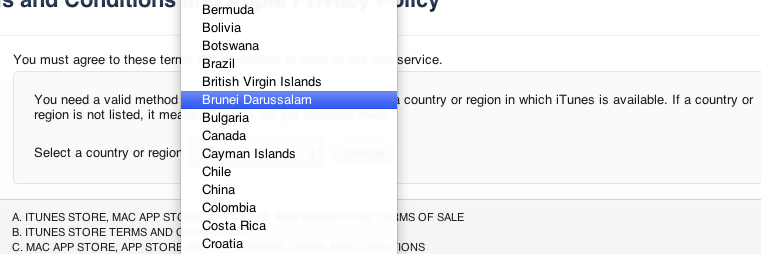
- We can register with a Brunei Credit Card
- AV Electronics, the premium reseller of Apple products, says they aren’t currently selling Brunei iTunes gift cards
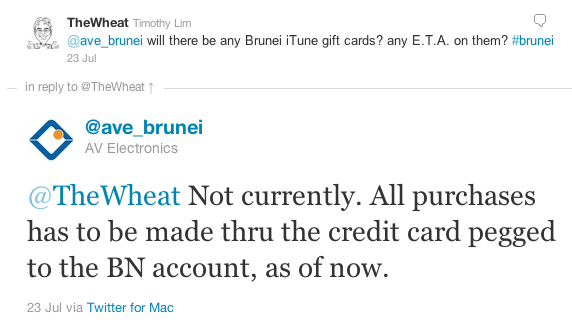
- Registration without a credit card is possible with the same hack/work around to register a US account without a credit card (try download a free app in the App Store and create an account from there)
- Brunei just has an App Store, not a full iTunes store with Music / Movies / TV Shows
- Not all apps available in the iOS App Store: e.g. WhatsApp (could be developer’s setting when publishing app or some other unknown restrictions)
- Prices shown in store are in US dollars
- App ratings are reset meaning Brunei apps could make it to the recommended list
- Sources for US gift cards: PC Game Supply / Jerry Cards (I have bought once from each of these sellers before and can verify that they work)
Corner Geeks 7: Live Streaming - Part 2
We get back into podcast producing and we resume our topic on “Live Streaming” (part 1 here) giving details of how to set up a more advanced live streaming system. Some related links on the topics we covered are listed below. Feel free to add your own links in the comments with regards to tools you use for live streaming
Live Streaming Services
- uStream (Free): has co-hosting, recording features and mobile client (iOS, Android, Windows Phone)
- Justin.tv (Free): has desktop and mobile clients(iOS, Android)
- Livestream (Free)
- Stickam (Free): co-hosting and mobile clients (iOS, Android, J2ME)
- Vokle (Free): new and modern with good co-hosting feature and recording. Latency was an issue when we used it. No mobile client
- Google Plus (Free): not really live streaming but can have up to 10 people video chat but latency was good
- Vidyo (commercial)
- Bitgravity (commercial)
- Wowza: set up your own streaming server (i.e. make your own uStream.tv)
Live Streaming Utilities
- Flash Media Encoder (Free, Windows, OS X)
Video Effects
- uStream Producer (Free: OS X, Windows): easy transitions and allows output of webcam/pictures/movies/screen/music and also has PIP support. No text overlays
- CamTwist (Free: OS X): powerful with many video effects. can do screen casting, slideshows, movie playback, changing of video sources, text and image overlays and so much more
- ManyCam (Free: OS X, Windows): easier than CamTwist to use, has screen casting, displaying of images (slideshow), movies, text overlays
- Webcam Studio for Linux (Free: Linux): seems like a CamTwist for Linux which advance functionality
Other Hardware
- Eye-Fi: an SD card with wireless capabilities for wireless transfer from camera to computer
- Zoom H1: used as a line-in recorder
Video Switching
- BoinxTV (Commercial, Software): software is to be installed on a Mac to provide TV studio like functionality. Check out Daniel’s video of how it used it for the Making of Gear 65 #28
- Tricaster (Commercial, Software & Hardware)
- Sony Anycast (Commercial, Software & Hardware)
Audio Effects
- Line-in (Free, OS X): simple tool that sends audio from one sound device to another
- LadioCast (Free, OS X): an Icecast client but has the ability to do audio mixer and piping
- Soundflower (Free, OS X): creates 2 sound devices which can be used as streams to pipe audio from one app to another
- JACK (Free, Linux, OS X): Jack OS X - similar to Soundflower
- VACard (Free, Windows)
The Zoom H1 Handy Recorder
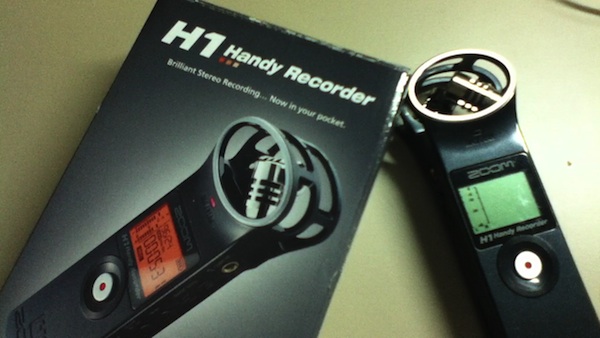 Earlier this year I bought the Zoom H1 Handy Recorder off eBay (US$105 including shipping) to be used as a line-in recording for my church but also for possible podcasting use. It has been used both as a stereo microphone as well as a line-in recorder for Corner Geeks. Check out the video review below or click this YouTube link
http://www.youtube.com/watch?v=WgjtRBSIsWk
Overall, it’s a great budget recorder that can be powered over USB but sadly cannot be used as a USB microphone. I would highly recommend it for anybody who wishes to start recording interviews. If you wish for something a bit more compact the Tascam DR-08 may be better option.
Features (from samsontech)
- Stereo X/Y mic configuration captures perfect stereo images
- Same frequency and SPL handling as popular Zoom H2
- Records Broadcast WAV (BWF) at 96kHz/48kHz/44.1kHz at 16-bit or 24-bit
- Records MP3 from 48 to 320kbps for maximum recording time
- Hi-Speed USB 2.0 port (mini USB)
- Built-in reference speaker
- Includes 2GB microSD memory card and one AA battery
- One AA size battery allows 10 hours operation
- Accommodates up to 32GB microSDHC memory cards
- Track marker function
- Low cut filter
- Built-in tripod mount (1/4", 20 threads)
- 1/8-inch (3.5mm) external mic input
- 1/8-inch (3.5mm) stereo line output
- Auto record level
- Optional accessory package (APH-1) includes windscreen, AC adapter (USB type), USB cable, adjustable tripod stand, padded shell case and mic clip adapter
Other Notes
- Can be used with either external microphone or line-in recording levels
- Stereo microphones are angled such that in an interview, one mic can be pointed to the interviewer and other other the interviewee giving better sound separation
- Can dynamically change recording levels while recording without having to stop the recording
- If external microphone / line-in cable is removed, the recording automatically switches to the in-built microphone (the opposite is true as well: automatically switches to external microphone / line-in once connected)
- Can be powered off USB after turning on the device: great if you’re low on battery. I’ve had some issues where connecting the USB port to power the device causes humming in the recording, but that could be due to my cables, but it is something to note
- Cannot be used as a USB audio device/microphone when attached to a computer
- Plastic makes it seem cheap
- Tripod mount is made of plastic so wear and tear may not be good to it
- No windscreen provided so be careful of any wind blowing or breathing into the microphones that can mess up the recording
- The rounded end on top of the recorder gives it a bulge and makes it a bit more difficult to store away without a proper hard case
- May be considered a bit bulky compared to the Tascam DR-08 which is half the thickness
Podcasting Setup in OS X - Version 1
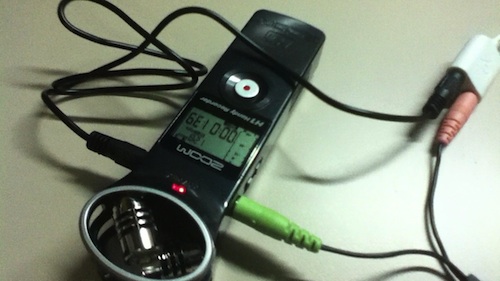 This is the first version of my podcasting setup that I’m relatively happy with as it is clean without too much things going on. I’ve used this for Corner Geeks and some Tech Talk Coffee Shop episodes.
If you’re curious of what podcasting is, it is the production of podcasts. Podcasts are basically recorded shows that are downloadable off the Internet. Do listen to Simply Geek #8 – Podcasting where they discuss it in further detail. Those interested in podcast production check out Simply Geek #17.1: Podcast Production Part 1 and Part 2 that I had to opportunity to play guest in
I explain the process of my setup in the Youtube video below http://www.youtube.com/watch?v=f7qWhE1EZK4
Setup includes the following:
- Zoom H1 - bought off Ebay for about US$100
- Steel Series Mobile Devie Adapter - bought at Chong Hock in Kiulap for about B$26. This is needed as the MacBook Pro has a headset jack instead of individual stereo out and microphone in jacks
- A regular headset
- LineIn - a free software utility of OS X
An alternative to LineIn is Audacity (enable “Software Playthrough” in the Transport menu and click “Start Monitoring” in the input device) or LadioCast but LineIn is the simplest method for this setup. For Windows and Linux users, the Audacity method should work just fine.
If you have any questions, feel free to leave a comment or tweet me @thewheat and in the mean time listen to some Brunei-made podcasts: Corner Geeks and Talking Aloud
Live Stream Setup for Ran8adidas
So a couple of weeks back we had the honour of live streaming of Ran8adidas (the 8th year anniversary celebrations of Ranoadidas.com) at the International Convention Center (ICC). We share with you how we managed to get mobile video in the field with the ability to add overlays and mix the audio source with any audio source while at the same time live streaming and recording it. http://www.youtube.com/watch?v=2GtsU0dhJIs (Watch on YouTube)
Watch the recorded video from this setup at http://www.ustream.tv/channel/ran8adidas
Our Setup:
- WebCamera for iOS (US$2.99) running on an iPod Touch or iPhone to act as video and audio sources out in the field
- Mobiola WebCamera (free) on the streaming computer to retrieve video and audio from the iOS device (they show up as webcam video and microphone audio devices)
- 3G modem used as an Internet connection
- OS X’s Internet sharing to ensure the iOS device and the computer are on the same network
- CamTwist (free) to add overlays and text
- MacBook Pro line-in port to receive sound from the mixer
- A USB sound card to be used as audio out for monitoring
- Soundflower was used as extra audio devices to aid the transfer of audio from audio sources to audio outputs
- LadioCast (free) for audio mixer/switching between mixer and iOS device audio
- uStream.tv (free) to stream and record the live video and audio
Other notes:
- The video quality wasn’t great and it was a trade-off between faster frame rates vs better image quality and resolution which were limited factors of the WebCamera application (192x144 vs 480x360, but I’m not sure to measure the frame rate). We decided on better image quality as it would be made worse by the spotty 3G connection
- We tried using uStream Producer (free) but it was inconsistent as it dropped after 30 seconds. I wonder if this could be due to the 3G reception.
- If you have an Android device you can use IP WebCam (free) to stream the video and audio from the device to a computer. I used 2 different instances of VLC (free) to play the video and audio. The video could then be captured using CamTwist and the audio controlled with LadioCast
- We experimented with PocketCam for iOS ($4.99) paried together with the PocketControl (free) client software but the delay in video and audio was too great, ~10 seconds.
- Alternatives to CamTwist (OSX) are ManyCam (Windows / OSX) and WebCam Studio for GNU/Linux (Linux) but CamTwist has quite a few nifty features and would recommend it
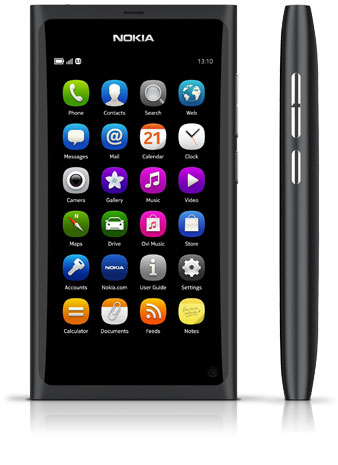
Corner Geeks 6: The Nokia N9
 Related Links
Notable Hardware Specifications
- Quad-band GSM/EDGE 850/900/1800/1900
- Penta-band WCDMA 850/900/1700/1900/2100
- Screen size: 3.9"
- Resolution: 16:9 FWVGA (854 x 480 pixels)
- AMOLED display
- Capacitive touch screen
- 8 megapixel camera with Carl Zeiss optics
- HD quality video capture in 720p resolution at 30 fps
- Wide-angle lens
- Large lens aperture F2.2 for better and faster photos in low light conditions
- Dual LED flash
- Continuous autofocus
- Touch-to-focus and exposure lock
- Internal memory: 16 GB or 64 GB
- RAM: 1 GB
- Dedicated power, camera and volume keys
- NFC (Near Field Communication) for easy pairing and sharing
- WLAN IEEE802.11 a/b/g/n
- Bluetooth 2.1 +EDR (Enhanced Data Rate)
- High-Speed USB 2.0 with micro USB connector for transferring data and charging
- 3.5 mm AV connector
- Micro SIM card
Notable Software Specifications
- MeeGo for Nokia N9 (MeeGo 1.2 Harmattan)
- User interface simplified to three home views: events, applications and open apps
- Swipe gesture instantly takes you back to the home view you started from
- Multitasking and app switching through open apps view: a live snapshot of all running apps
- Apps compliant with Qt 4.7
- Software updates over the internet
- Support for MS Outlook synchronisation of contacts, calendar and to-do with Mail for Exchange
- Support for viewing documents in Word, Excel, Powerpoint, PDF and Open Document Formats
- Online calendar synchronisation with CalDAV
Huawei Ideos S7 Overview
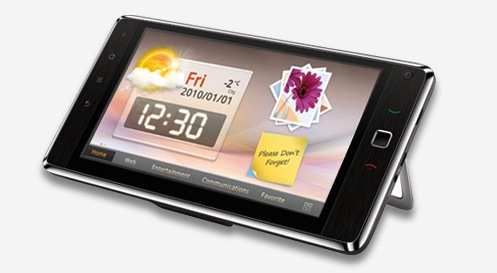
I managed to stumble upon the Huawei IDEOS S7 at Yappe IT Store in Serusop selling for B$399 (cash price) and when recording the video below I noticed that quite a few of them have already been bought. Check out the video giving an overview of the device
http://youtube.com/watch?v=xVaOxUi0eUQ
Specifications
- CPU: 750 MHz Qualcomm Snapdragon (source: UMPCportal as we forgot to check the processor but it seemed decent enough)
- GPU: Adreno 200
- 7" 800x480 (WVGA) Capactive Multi-Touch Screen
- Android 2.2 with custom launcher
- Front and Rear facing 2 megapixel cameras that record in CIF (352x288)
- 8GB storage (7.51GB available but 116MB for apps)
- 3G Enabled (standard SIM) with dialer (can make calls and text)
- Can run Flash (installed from Market)
- Upto 720p HD playback of mp4 (h264, aac), wmv files
- Device seems rooted by default (Superuser was installed after factory reset)
- Connectivity options: Bluetooth, Wi-Fi, GPS, microSD card slot, docking port, 3.5mm headset
- Other hardware details: Kickstand, Removable battery, Optical trackpad
Pros
- Budget price B$399: great budget device for a 7" tablet and phone with calling ability
- Able to run Flash for a fuller web experience (put settings as ‘On-Demand’ for better performance)
- Android 2.2 thus you can do mobile tethering (share 3G via Wi-Fi)
- Rooted
- Cold boot / Restarts in about 1 minute
- Decent Performance: it did not seem sluggish or noticeable slow but there were times where it took multiple touches to get the device to respond (could be also due to the plastic film on the device screen)
Cons
- Only 116MB free for apps
- A few default apps are landscape oriented and don’t rotate if device is in portrait mode
- No Office software to read Word/Excel/Powerpoint files (doc/docx/xls/xlsx/ppt/pptx)
- Battery life may be bad (based on Telstra T-Touch Tab reviews it only has 3-4 hours of typical use: CNET Australia, PC World Australia, Sydney Morning Herald. The T-Touch Tab is a rebranded Huawei S7 but has slightly different hardware)
I doubt this will get any future upgrades because it is an older model and Huawei is releasing an S7 Slim and also the recently announced Media Pad. The main issue with the device will be the battery life: having a removable battery aids it but then you will have to buy another battery and external charger to keep it running. I was contemplating on the device and using it as a mobile hotspot with my b-mobile Zoom! SIM card and using it as a tablet for reading and on the go computing. However with the possible battery life issues, the best bet for my use case is still the Samsung Galaxy Tab which will cost about B$250 more but you get better hardware and a better overall experience. But having said that, I believe this is the cheapest 3G and Flash enabled Android tablet in Brunei. If you’re looking for a budget all-in-one phone and tablet device, and don’t mind the possible battery life issues, this is a good deal.