 Corner Geeks
Corner Geeks 16: WWDC 2012 - Part 2 - Mountain Lion

- OS X Mountain Lion will be released next month (July) for US$19.99
- iCloud integration
- Messages
- iMessage comes to the desktop
- Multi-protocol client (AIM, Yahoo!, Google Talk, and Jabber) with document/photo/video transfer and video Facetime
- Notification Center:
- from iOS to OSX
- Ability to update Twitter / Facebook status
- An alternative to Growl
- Sharing service: similar to iOS
- Power Nap: automatic backup and updates while sleeping
- Dictation:
- Facebook Integration
- Gatekeeper: forcing apps in the AppStore to be sandboxed for better security but may remove functionality
- Over 200+ new features
Corner Geeks 15: WWDC 2012 - Part 1 - iOS 6

- New Maps application with turn by turn directions, traffic reports and flyover aerial view
- A better Siri
- Sports, movies and restaurant integration
- Ability to post to Facebook and Twitter
- Application launching
- Eyes Free for voice control features while driving
- Facebook Integration: similar to previous Twitter integration but better with added contact and calendar integration
- Passbook: a ticketing/coupon application to consolidate all items in one location (with time and location integration)
- Better photo sharing
- Improved Safari: tab syncing to the cloud and other iDevices and offline reading capability
- Facetime over cellular
- Coming in the fall to the iPhone 3GS/4/4S, iPod touch 4th generation, iPad 2 & the new iPad
Read more about iOS 6 at Apple.com
Corner Geeks 14: Post-PC Musings
Before recording episode 13 Firdaus and I had a pretty lengthy discussion regarding some post-PC topics. Too good a conversation to pass up that I’ve presented it as a standalone episode
Topic Related Links
- Windows 8: Consumer Preview | Metro UI on Wikipedia | Metro style design principles (MSDN)
- Ubuntu: Website | video of HUD (embedded below)
- Linus Torvalds: Wikipedia article | Google+
- Mark Shuttleworth: Wikipedia article | Blog
- Richard Stallman: Wikipedia article | Home Page
- FileApp for iOS
- Tags / Metadata: Wikipedia article
- Nepomuk and KDE’s semantic desktop and what it means to the user
- ID3 Tags: Wikipedia article
- Gmail Labels
Corner Geeks 13: The new iPad
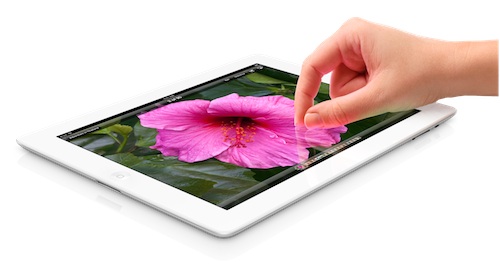
- 4x resolution increase (2048x1536 vs old 1024x768)
- Quad core graphics A5X (still dual core CPU)
- 5MP rear camera (1080p video recording)
- 4G (LTE) for US$130 more (different model for different carriers)
- Other notable features
- Internet hotspot tethering: finally can tether mobile data to other devices via WiFi (and presumably Bluetooth as well)
- Voice dictation: mic button on keyboard to activate dictation
- Bluetooth 4.0
- Same price point as iPad 2 and same battery life
- Slightly thicker (9.4 mm vs 8.8mm) and heavier (652g vs 601g)
- Weight increase probably due to increase battery capacity (42.5-watt-hourvs old 25-watt-hour)
- Retail sales start March 16th (including Singapore) or March 23rd for the International release (no Brunei)
- Starting at US$499
The new iPad Wi-Fi
- 16GB: US$499 (S$658)
- 32GB: US$599 (S$788)
- 64GB: US$699 (S$918)
The new iPad WiFi+4G
- 16GB: US$629 (S$828)
- 32GB: US$729 (S$958)
- 64GB: US$829 (S$1088)
The old iPad 2
- 16GB WiFi: US$399 (S$528)
- 16GB WiFi + 3G: US$529 (S$698)
AV Electronis iPad 2 Pricing (via Facebook)
- WiFi
- 16GB/32GB/64GB: B$528 / B$638 / B$768
- WiFi+3G:
- 16GB / 32GB / 64GB: B$698 / B$808 / B$938
App updates
- iWork (US$9.99 for each app): Pages, Numbers, Keynote
- iMovie (US$4.99): outlining and storyboarding
- Garageband (US$4.99): 4 iOS devices can jam in real time via bluetooth or Wi-FI
- New iPhoto(US$4.99):
- Multi-touch editing/touch-ups
- Can work with 19mp photos
- Share via iCloud with public link.
- Photo beaming share to iOS devices over bluetooth or Wi-Fi
In other notes
- iOS 5.1 was announced and is ready to be downloaded
- Siri for other languages including Japanese
- Increase of max app size downloadable OTA (i.e. via 3G/4G) to 50MB (previously 20MB)
- New Apple TV with 1080p playback support and redesigned interface.
- iTunes update: supports movies in the cloud: can redownload from any device and watch
Corner Geeks 12: Mobile World Congress 2012

It took us a while to get back in the groove but we’re back and covered some Mobile World Congress 2012 news.
HTC
- new HTC One series unveiled
- Superfast photo capture: 0.7 seconds to take a photo , 0.2-seconds autofocus
- Capture a photo in the midst of recording HD video
- 25 gigabytes of free Dropbox space for two years
- All devices: Android 4.0 (ICS), HTC Sense 4, Bluetooth 4.0, Beats Audio
- One X & One XL
-
4.7" (1280x720) HD screen
-
X:
- 1.5 GHz, quad core
- 32GB storage, 1GB RAM
-
UMTS: 850/900/1900/2100 MHz
-
XL:
- 1.5 GHz, dual core
- 16GB storage, 1GB RAM
-
UMTS
-
ATT: 850/1900/2100 MHz
-
Asia/AUS: 850/900/1900/2100 MHz
-
LTE
-
ATT: B4/B17
-
Asia/AUS: 1800/2600 MHz
-
8 MP camera (1080p video)
-
F2.0 aperture and 28mm lens,
-
1.3 MP front camera (720p video)
-
NFC
-
No microSD slot
-
microSIM
-
- One S: midrange
- 4.3" (540 x 960) screen
- 1.5 GHz, dual core
- UMTS: 850/900/2100 MHz
- 16 GB storage, 1 GB RAM
- 8 MP camera (1080p video)
- F2.0 aperture and 28mm lens,
- VGA front camera
- microSIM
- No microSD slot
- UMTS: Europe/Asia: 850/900/2100 MHz
- One V: budget
- 3.7" (800x480) screen
- 1 GHz CPU
- 5 MP camera (720p video)
- 4 GB storage, 512 MB RAM
- Expansion slot: microSD slot
- UMTS: Europe/Asia: 850/900/2100 MHz
Sony
- Xperia S companion devices: Xperia P (mid range) and low end (budget)
- Overview: Reasonable screen size, dual core but Android 2.3 with ICS supposedly coming in Q2
- Sony Xperia P - mid range
- 4" (960 x 540 pixels) Reality Display
- 1 GHz , dual core
- Android 2.3 (Upgrade to Android 4, Ice Cream Sandwich, planned in Quarter 2 2012)
- 8 MP camera (1080p video)
- 0.3 MP (VGA) front camera
- 2D and 3D panoramic images.
- 16GB flash storage. 1GB RAM
- NFC
- UMTS: 850, 900, 1900, 2100
- Sony Xperia U - budget
-
3.5" (854 x 480) Reality Display
-
1 GHz dual core
-
Android 2.3 (Upgrade to Android 4, Ice Cream Sandwich, planned in Quarter 2 2012)
-
5 MP camera (720p video)
-
0.3MP (VGA) front camera
-
4GB storage, 512MB RAM
-
UMTS
- 900, 2100 MHz (Global except Americas)
-
850, 1900, 2100 MHz (Americas)
-
Huawei
- Press release: Huawei releases their own quad-core CPU said to be better performing and lower power consumption
- Overview: 4.5” 720p phone screens with ICS
- Ascend D Quad
- 4.5" (1280x720) screen
- Huawei quad core 1.2GHz/1.5GHz
- Android 4.0
- 8 MP camera (1080p video)
- 1.3 MP front-facing camera
- 8GB storage, 1GB RAM
- UMTS: 850/900/1700/1900/2100 MHz
- Ascend D Quad XL
- 2500mAh vs standard 1800mAh in Ascend D Quad
- Ascend D1
- 4.5" (1280x720) screen
- 1.5 GHz dual core
- Android 4.0
- 8GB storage, 1GB RAM
- UMTS: 850/900/1700/1900/2100 MHz
- MediaPad 10 FHD
- 10” (1920 x 1200) IPS screen
- 1.5 GHz K3 quad-core processor
- Android 4.0
- 8 MP camera
- 1.3 MP front camera
- 2G RAM
Viewsonic
-
Dual SIM phones
-
ViewPhone 4s
- 3.5" (640x960) screen
-
1GHz processor
-
5 MP rear camera
-
0.3 MP (VGA) front camera
-
Android 4.0
-
Dual SIM
-
ViewPhone 5e
- 5" (800x480) screen
-
Android 4.0
-
Dual SIM
-
ViewPhone 4e
- 3.5" (480x320) screen
-
650MHz
-
Android 2.3
-
512MB of RAM
-
3MP camera
-
Dual SIM
Samsung
-
- 10.1 1280 x 800 TFT LCD
-
Android 1.0
-
64GB storage
-
3 MP camera, 2 MP front camera
-
Pressure sensitive S-Pen
-
Preloaded with specially designed versions of Adobe Photoshop Touch, Adobe Ideas and other graphical software items, users can draw graphics and sketches and edit images on the device
-
Split screen option: , users can ‘break’ the 10.1-inch display in two, with S Note on one side, and a live web-browsing or video playing window on the other side.
-
- 4" (800x480) display
- 1GHz dual-core processor
- Android 2.3
- TI DLP nHD (640 x 360) Projector built into phone
Nokia
- Nokia Lumia 610
- 3.7" (800 x 480) LCD screen
- 800MHz + 256mb memory
- Most affordable Lumia smartphone yet
- WinPhone 7.5
- UMTS: 850/900/1900/2100 MHz
- No microSD slot
- Nokia 808 PureView
- 4" (640 x 360) AMOLED screen
- 1.3GHz CPU
- 41 MP camera sensor
- Typical 5 MP photos utilizing 7 pixels to 1 ‘superpixel’ for better image quality
- Lossless video zoom: 1080p 4x, 720p 6x
- Symbian, S3 Belle
- UMTS: 850/900/1700/-21001900/2100 MHz
- NFC
Corner Geeks 11: SugarSync
SugarSync
-
Free 5GB with no file size limit (source)
-
SugarSync’s comparison page
-
Main Sections
-
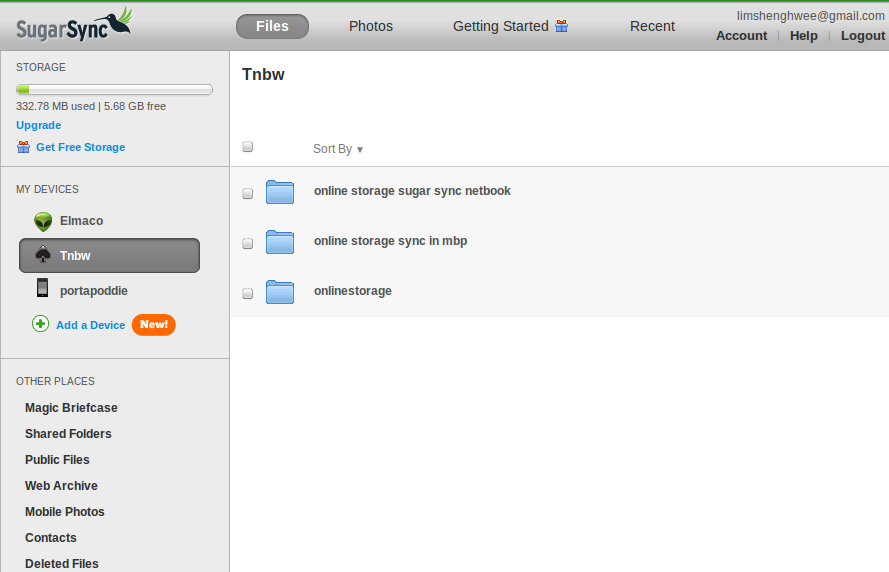
Synced Folders: select which folders which are to be available for syncing with other devices (can select any folder on computer and use SugarSync manager to select with folders to Sync with)
-
Magic Briefcase is the Dropbox folder. Anything in it will be synced to all computers with it installed
-
Web Archive: web backup but not available to sync
-
Mobile Photos: photos from mobile devices
-
Upload by email
-
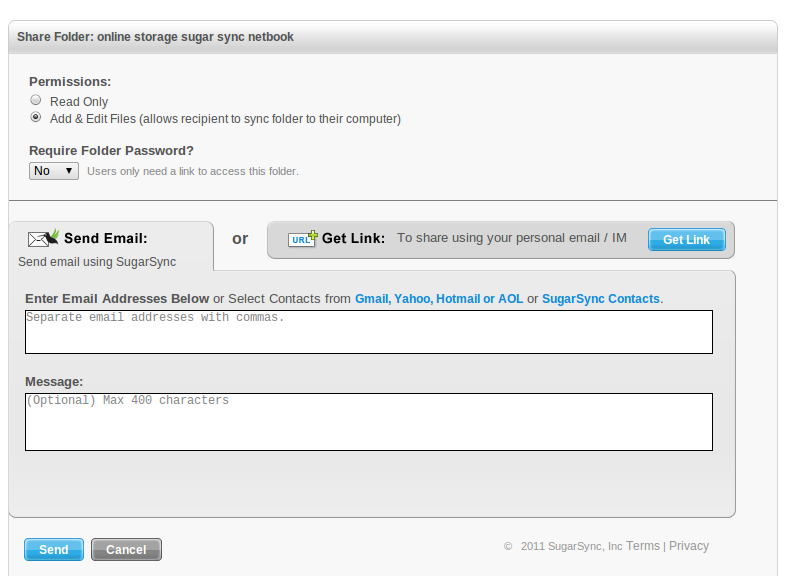
Good sharing: can share within app itself. read / write access
-
Selectively share any file
-
Share folder
-
Photo gallery (to public)
-
File structure (to SugarSync users)
-
Web Client available
-
Mobile Client applications are pretty full featured:
- Can share folders / files straight from the device
- Ability to manually sync folders/files to the device: good if going offline
- Added bonus: Android does background photo upload and syncing.
-
Cons: Versions only 5 previous versions
-
Availability: Windows, OS X (No Linux), iOS (iPhone, iPad, iPod touch), Android, BlackBerry, Windows Mobile, Symbian
-
500MB referral bonus (free account) or 10GB if referral to paid subscriptions of 30GB or more with no limit (source)
-
Cheaper than Dropbox (SugarSync plans vs Dropbox plans)
-
30GB @ $4.99/month or $49.9/year
-
60GB @ $9.99/month or $99.99/year
-
100GB @ $14.99/month or $149.99/year
-
250GB @ $24.99/month or $249.99/year
Corner Geeks 10: Online Storage and Dropbox

Dropbox https://www.dropbox.com
-
Free 2GB with no file size limit
-
Can increase storage by referrals (250MB for each up to 8GB). Must sign up and Install
-
A Dropbox folder . Anything you drop there will be synced to any computer that access to the same folders
-
Stored locally on computer (no need to download to retrieve as it is auto downloaded when changed elsewhere)
-
Simple. Just save files in the Dropbox folder
-
Can share folders (full read and write access only)
-
Versions of documents for the past 30 days
-
Public folder: but folder link does not show all files in that folder, i.e. must direct link to each file
-
Bandwidth limits for public files: 10GB/day limit for free plans, 250GB/day for paid plans
-
Quite expensive for paid plans:
- 50GB $9.99/month or $99.99/year
- 100GB $19.99/month or $199.00/year
-
Clients for: Windows, OS X, Linux, iOS, Android, BlackBerry
-
Web Access via website
-
Closed source
-
Recent security issues: optional passwords, config.db issue
Corner Geeks 9: Live Streaming setup for Ran8adidas
Show Notes
What we wanted
- Live streaming of the event
- Video
- multiple cameras if possible
- perhaps one overview shot
- one on-the-go camera following events like the Twitter hunt. Follow contestants around “Amazing Race” style
- Sound
- clean sound from the mixer for opening ceremony / speeches
- also want to capture atmosphere/sound around the camera
- Internet
- need for streaming
- simplest of them all. 3G dongle
- Master control at the laptop controllilng the stream / switching audio and video accordingly
Mobile video
- DSLR / camcorder approach:
- Possible but need wireless transmitters making it cumbersome
- DSLR sensor limited time
- Keep-it-Simple-Stupid approach:
- Use smartphones with Wifi and cameras
- Small, simple, only need wireless access point if needed
- Possible to attach external microphone to device for interviews
- Advantages
- Can move around freely
- Requires no additional hardware for video capture hardware on computer.
- Fairly cheap and easy to setup if you already have the devices (more people have smartphones now)
- Disadvantages
- Latency
- Lower quality?
- Potentially unreliable connection vs wires? Wireless inteference. Network going down?
- No zoom!
- Mobile Video apps
- IP Webcam
- Android
- Free
- Starts a webserver on camera device. Accessible from any computer on the network. View and listen in a browser
- PocketCam (Desktop software)
- iOS / Android
- US$4.99 / BND$6
- Windows or OS X software to be installed on the host
- Creates video and audio device driver on host. Once connected access like a webcamera and USB mircophone
- Audio lag!
- WebCamera
- iOS / Blackbery / WinMo / Symbian
- US$2.99 / US$19.95 / US$19.95 / US$9.95
- Works similar to PocketCam: Windows or OS X software to be installed on the host
- Used iOS version that can take video and photo from camera and it will send it to host computer
- There are other apps for Android and iOS but many do not provide audio which is what we wanted
- IP Webcam
- Multiple Camera feasibility study
- IP Camera: separate VLC instance for each video and each audio for each camera. Gets complicated very fast
- Pocket Camera / WebCamera: only one PocketCamera / Webcamera host software allowed to run at one time on one machine
- Not possible to use multiple cameras using only one app. Mixer and match is possible
- Needed proper communication between in-the-field camera user and master control
Sound
- Input from mixer via line-in on laptop (not don’t have get a USB sound card)
- LadioCast for audio mixing and piping of audio. Can even monitor sound without sending it to live stream
Internet
- Needed wireless coverage
- Used iPod Touch as a WiFi signal monitor. Activated voice control, tap the wireless signal to hear the strength level (probably there is an app for this but did not explore)
- To forgoe a 3G router: OS X Internet sharing (Connetify.me for Windows)
Other things we used
- Phone holder to tripod mount
- Can get the at a shop in the Mall, near Netcom. Can’t remember name
- Others options at DealExtreme
- Tripod: can place camera in certain places. Can extend tripod to get different angles
- Charging cables! Must remember to charge mobile devices. iPod Touch 4G lasted about 2 hours of streaming
Final Setup
- iOS Webcamera easiest to work with
- CamTwist to add overlays
- Ladiocast to pipe audio. Connected to mixer when needed. Add microphone from the mobile cameras when interviewing / asking questions
- Tripod to place camera so no need to be there
- uStream to send out stream and record it
Other Considerations
- Phone upgrades:
- External microphone using Steel Series Headet adapter (Kiulap) which gives headphone output and microphone input. can be used for better interviews
- Battery packs
- Stablizers / Lens
- Owle Bubo
- SLR Lens mount Photojojo
- Other Links
- External Microphones for iPhone 4, iPad and iPod Touch Audio input
- Handheld Hollywood: Site for using things like iPhone and stuff for content creation.
- Have a sign that says, “we’re streaming live”. While recording I was thinking of the implications of this for privacy
- Have a dedicated chat room to interact with the viewers. At least had a screen of some hashtag that we could sometimes show on twitter.
- Get better upstream for better video and audio
- Have a dedicated screen / projector / laptop on our booth showing what’s streaming.
Corner Geeks 8: The Brunei Apple App Store
A ’live’ / non-Skype Corner Geeks recording this week as I sat down with @mfirdaus as we discussed the Brunei Apple App Store while also passing him the InstallESD.dmg file for Lion. We hope that this is the start of more services being opened to Brunei and perhaps a legal way for people to get music, movies and TV shows in the future.
Show Notes
- Apple brings the iOS and Mac App Store to 33 new territories, including Brunei!
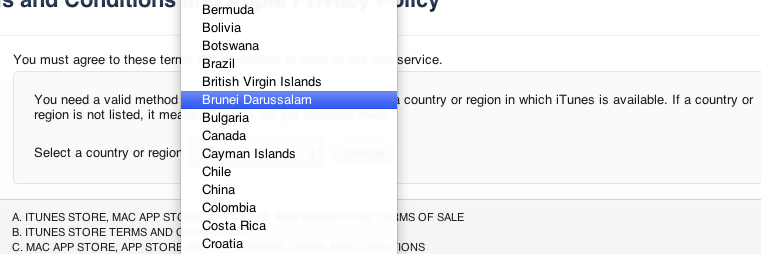
- We can register with a Brunei Credit Card
- AV Electronics, the premium reseller of Apple products, says they aren’t currently selling Brunei iTunes gift cards
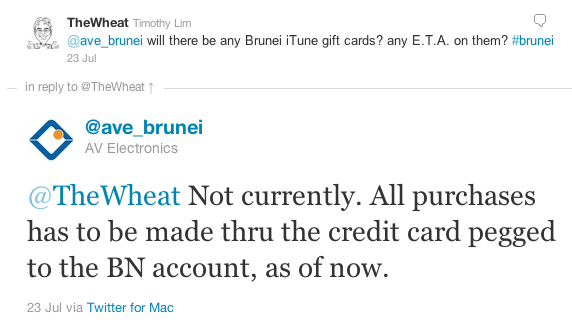
- Registration without a credit card is possible with the same hack/work around to register a US account without a credit card (try download a free app in the App Store and create an account from there)
- Brunei just has an App Store, not a full iTunes store with Music / Movies / TV Shows
- Not all apps available in the iOS App Store: e.g. WhatsApp (could be developer’s setting when publishing app or some other unknown restrictions)
- Prices shown in store are in US dollars
- App ratings are reset meaning Brunei apps could make it to the recommended list
- Sources for US gift cards: PC Game Supply / Jerry Cards (I have bought once from each of these sellers before and can verify that they work)